Cinematic 80s Vintage Men’s Aesthetic: How to Generate 35mm Blue Hour Portraits with AI
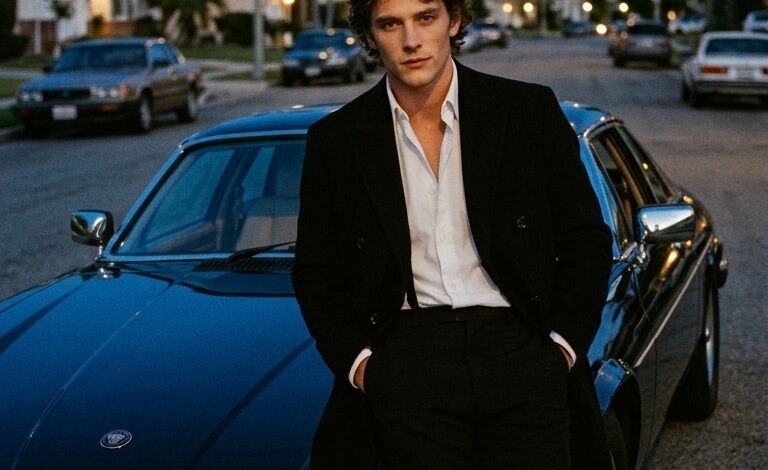
Creating authentic 1980s film-style photography using AI requires more than just adding a retro keyword to your prompt. Achieving true vintage cinematic realism—complete with natural 35mm film grain, analog color science, realistic metallic reflections, and moody atmospheric lighting—demands precise prompt architecture.
This guide breaks down the exact copy-paste AI prompt used to capture an iconic 1980s Los Angeles blue hour aesthetic featuring classic automotive styling, dissects the prompt mechanics, and provides customizable variations for Midjourney and Google Gemini.
Master Copy-Paste AI Prompt
Copy and paste the exact prompt below into Midjourney, Google Gemini, or your preferred AI image generator to replicate the vintage 80s cinematic look:
Master Prompt:
Portrait of a man in a black coat with a white shirt, leaning on his shiny black jaguar xjs v12, street photography, with a grainy film look, captured during the blue hour on a summer evening in the suburbs of los angeles, photographed in the style of arriflex using kodak gold 400 film.
Anatomy of the Prompt: Why It Works
Understanding how each element of this prompt guides the AI engine allows you to tweak and adapt it for different retro concepts without losing visual quality:
| Prompt Component | Purpose & Visual Impact |
| “Portrait of a man in a black coat with a white shirt” | Establishes a classic, timeless wardrobe contrast that grounds the image in iconic mid-century and 80s menswear aesthetics. |
| “Leaning on his shiny black jaguar xjs v12” | Introduces a specific vintage automotive anchor, providing complex curved metallic surfaces that reflect ambient lighting. |
| “Street photography… suburbs of los angeles” | Directs the background environment, composition style, and overall spatial narrative to feel authentic rather than staged in a studio. |
| “Blue hour on a summer evening” | Dictates the exact color temperature, casting deep indigo and cobalt ambient light across the scene to create low-key cinematic contrast. |
| “Style of arriflex using kodak gold 400 film” | Forces the rendering engine to emulate real analog optics and film stock—delivering classic warm skin tones, subtle halation, and rich film grain. |
4 Vintage Cinematic Variations
Modify the master prompt to explore different vehicle choices, lighting conditions, and retro atmospheric styles.
1. 80s Neon Sunset Drive
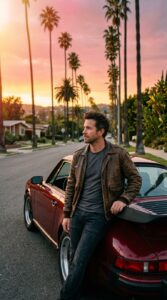
Prompt: Cinematic portrait of a man in a vintage leather bomber jacket, leaning against a dark crimson Porsche 911 Turbo on a Los Angeles palm tree street. Captured during a vibrant pink and golden sunset, warm analog lens flare, grainy 35mm film look, photographed on Kodak Portra 400, Arriflex style camera aesthetic, rich shadow detail.
2. Midnight Rain-Slicked Noir
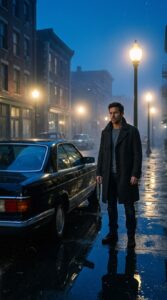
Prompt: Moody street photography portrait of a man in a dark trench coat standing beside a glossy black classic Mercedes-Benz SEC under glowing streetlamps. Wet asphalt with reflective puddles, thick misty atmospheric fog, deep blue hour night light, filmed on 35mm film, grainy texture, vintage 1980s cinematic aesthetic.
3. Retro Coastal Highway Dusk
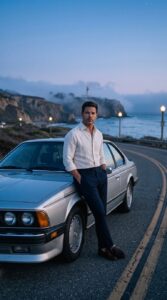
Prompt: Full-length vintage editorial portrait of a man in a tailored linen shirt resting on a vintage metallic silver BMW E24 6 Series on the Pacific Coast Highway. Soft twilight lighting, ocean fog rolling over coastal cliffs, cool blue hour tones, shot on Kodak Gold 200, 35mm film grain, retro cinematic composition.
4. Gritty Industrial 80s Flash
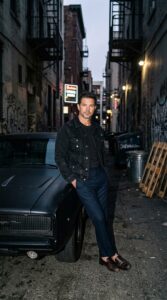
Prompt: High-contrast street portrait of a man in a black denim jacket leaning against a matte-black classic muscle car inside an alley at dusk. Captured with a vintage pop-flash effect, harsh contrast, heavy analog film grain, 1980s street photography style, Arriflex lens render, raw unpolished photographic detail.
Pro Tips for Generating Authentic Vintage AI Photos
-
Leverage Analog Film Stocks: Specifying film stocks like “Kodak Gold 400”, “Kodak Portra 800”, or “Fujicolor Pro 400H” instructs the AI to apply specific, realistic color palettes and grain behavior.
-
Combine Time of Day with Specific Locations: Keywords like “blue hour in suburban Los Angeles” combine color science (deep blue ambient light) with spatial atmosphere (residential trees, wide streets, low horizon).
-
Specify Camera & Lens Emulation: Mentioning cinema cameras like “Arriflex” alongside lens choices (e.g., “35mm prime lens”) helps steer the AI away from overly smooth, digital 3D renders toward organic film depth.