MidJourney Prompts
High-Fashion Urban Streetstyle AI Prompt: How to Generate Flash-Lit City Portraits
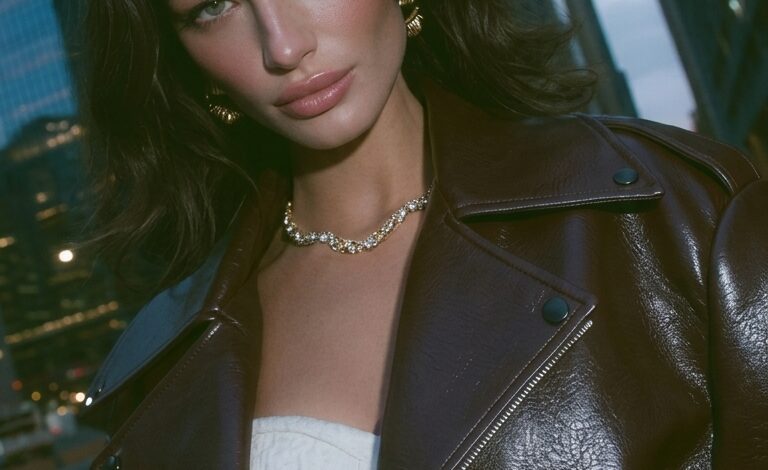
Creating fashion-forward, editorial-grade streetstyle photography using AI requires precise prompt construction. Standard prompts often produce over-processed, flatly lit images that lack the atmosphere of a night-time urban shoot. Achieving authentic high-fashion results—complete with crisp flash illumination, dark leather textures, subtle motion blur, and towering city skyscrapers—requires specific directives for camera gear, lighting techniques, and environmental depth.
This guide breaks down the exact copy-paste AI prompt used to generate high-impact urban streetstyle portraits, examines key prompt components, and provides versatile style variations for Midjourney and Google Gemini.
Master Copy-Paste AI Prompt
Copy and paste the exact prompt below into Midjourney, Google Gemini, or your preferred AI image generator to replicate the chic urban aesthetic:
Master Prompt:
High-fashion urban streetstyle editorial portrait of a stylish woman standing on a city street at dusk, framed by glowing skyscrapers and city lights. Wearing a dark, structured oversized leather jacket with silver hardware over sleek minimalist attire. Shot with direct harsh studio flash photography, creating sharp shadows and vivid color contrast. Wet-look slicked hair, confident gaze directly into the camera lens, raw night street background with subtle bokeh glare. Shot on 35mm prime lens, f/2.0 aperture, ISO 400, grainy film texture, high-contrast fashion magazine cover aesthetic, photorealistic detail, crisp focus, 8k resolution.
Anatomy of the Prompt: Why It Works
To tailor this prompt for your own creative campaigns, here is how each descriptive element shapes the AI rendering output:
| Prompt Phrase | Visual Function & Impact |
| “High-fashion urban streetstyle editorial portrait” | Establishes the composition and subject tone, guiding the model toward magazine-quality posing and styling. |
| “Structured oversized leather jacket… silver hardware” | Introduces tactile, high-contrast textures that reflect direct light sources effectively. |
| “Direct harsh studio flash photography” | Emulates vintage pop-flash fashion shoots, creating dramatic separation between the subject and the dark background. |
| “Framed by glowing skyscrapers… subtle bokeh” | Adds architectural scale and realistic background light-blur without overwhelming the foreground subject. |
| “Shot on 35mm prime lens, f/2.0 aperture, grainy film texture” | Simulates authentic analog camera optics, avoiding synthetic, overly smooth digital rendering. |
4 Urban Streetstyle Variations
Customize the master prompt to explore different moods, lighting setups, and visual aesthetics.
1. Cyberpunk Neon Night Shoot
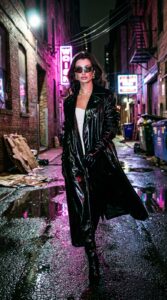
Prompt: Full-length fashion streetstyle portrait of a model walking through a wet, neon-lit metropolis alleyway at night. Wearing a long glossy black trench coat and futuristic sunglasses. Reflected magenta and cyan neon signs gleam off wet asphalt and leather. Shot with high-speed direct flash, shallow depth of field, 50mm lens, gritty cinematic atmosphere, hyper-detailed texture.
2. Golden Hour Architectural High-Fashion
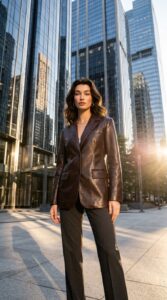
Prompt: Low-angle editorial portrait of a model standing near sleek glass skyscrapers during golden hour. Wearing a sharp dark leather blazer, tailored trousers, and minimalist silver jewelry. Warm direct sunlight casting long geometric shadows, soft lens flare, crisp micro-details, shot on 85mm portrait lens, professional fashion editorial aesthetic.
3. Vintage Film Flash Streetwear
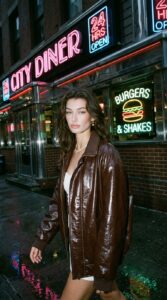
Prompt: Candid 90s-style street fashion photo of a model in an oversized leather bomber jacket standing outside a city diner under retro neon signs. Captured with a vintage point-and-shoot camera flash, heavy film grain, authentic color cast, stark lighting contrast, unpolished high-fashion street mood.
4. Rainy Dusk Runway Vibe
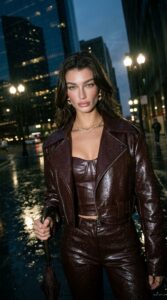
Prompt: Moody beauty and fashion portrait of a model holding a dark umbrella under rain-slicked city streetlights. Dark leather outfit with glistening water droplets, reflective pavement, soft glowing city lights in the background. Direct flash lighting highlighting facial features and wet fabric textures, shot on 35mm lens, raw film aesthetic, high resolution.
Pro Tips for Generating Realistic Urban Fashion AI Art
-
Leverage Lighting Cues: Terms like “harsh direct flash”, “pop-flash photography”, or “on-camera speedlight” are essential for generating authentic night-time contrast and sharp subject separation.
-
Define Fabric Textures explicitly: Specifying materials such as “grained leather”, “patent gloss”, or “heavy wool denim” helps the generator avoid flat or muddy surface rendering.
-
Incorporate Camera Specifications: Including photographic details—like “35mm lens”, “grainy film stock”, or “f/2.0 aperture”—forces the AI engine to mimic true optical depth rather than standard 3D-rendered visuals.